> For the complete documentation index, see [llms.txt](https://support.limy.ai/llms.txt). Markdown versions of documentation pages are available by appending `.md` to page URLs; this page is available as [Markdown](https://support.limy.ai/intelligence/prompts-overview/adding-prompts.md).
# Adding Prompts
This article explains how to add new prompts to your Limy account.
**Adding Prompts** allows you to customize the questions Limy tracks to better reflect your business, audience, and strategy. You can add prompts to ensure visibility analysis stays aligned with changes in your product, market, or priorities.
### How to Add prompts
{% stepper %}
{% step %}
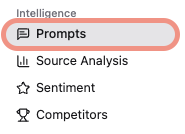
#### Navigate to **Prompts,** under **Intelligence**
{% endstep %}
{% step %}
#### Click on **Modify Prompts**, on the right side
{% endstep %}
{% step %}
#### Search for a specific prompt or expand a specific topic
{% endstep %}
{% step %}
#### Click on **Add Prompt**
{% endstep %}
{% step %}
**Enter the prompt and select its type, region, and intent.**
{% endstep %}
{% step %}
#### Click **Create**
You can now find your prompts under your topic
{% endstep %}
{% endstepper %}
### FAQ
What are prompts?
A prompt represents a question a user might ask an AI system when researching a topic, product, or brand in your category.
What’s the difference between branded and non-branded prompts?
Branded prompts explicitly mention your brand, while non-branded prompts focus on category or problem-based queries where your brand may or may not appear.
How often are prompts run?
Prompts are run every 24-96 hours to get the latest accurate result.
Can I modify prompts?
Yes. See the **Modifying Prompts** page for instructions on editing or removing prompts.
***
### Relevant Content
{% content-ref url="/pages/k4nrBG3HP9kOfzjahMqT" %}
[Modifying Prompts](/intelligence/prompts-overview/modifying-prompts.md)
{% endcontent-ref %}
{% content-ref url="/pages/6kAhYKOlGBTuwcBqHfMk" %}
[Prompts Overview](/intelligence/prompts-overview.md)
{% endcontent-ref %}
{% content-ref url="/pages/rhIt0brSQ0hkz06ZZFn1" %}
[Prompt Deep Analysis](/intelligence/prompts-overview/prompt-deep-analysis.md)
{% endcontent-ref %}
{% content-ref url="/pages/LoiAA6N4BPheGuTBYuCK" %}
[Dashboard Overview](/dashboard/dashboard-overview.md)
{% endcontent-ref %}
{% content-ref url="/pages/5MMZ2BXUk6D9mEVfmg0g" %}
[How Limy Generates Prompts](/intelligence/how-limy-generates-prompts.md)
{% endcontent-ref %}
Still have questions? We’re here to help. Contact us at **** - we’d be happy to assist.