> For the complete documentation index, see [llms.txt](https://support.limy.ai/llms.txt). Markdown versions of documentation pages are available by appending `.md` to page URLs; this page is available as [Markdown](https://support.limy.ai/plans-and-billing/how-to-deactivate-your-account.md).
# How to Deactivate your Account
This article will show you how to deactivate your Limy account.
You can cancel your Limy subscription at any time. Once canceled, your subscription will remain active until the end of the current billing period.
### How to Cancel your Account
{% stepper %}
{% step %}
#### Log in to your Limy Account
{% endstep %}
{% step %}
#### Go to Setting
{% endstep %}
{% step %}
#### Select Subscription
{% endstep %}
{% step %}
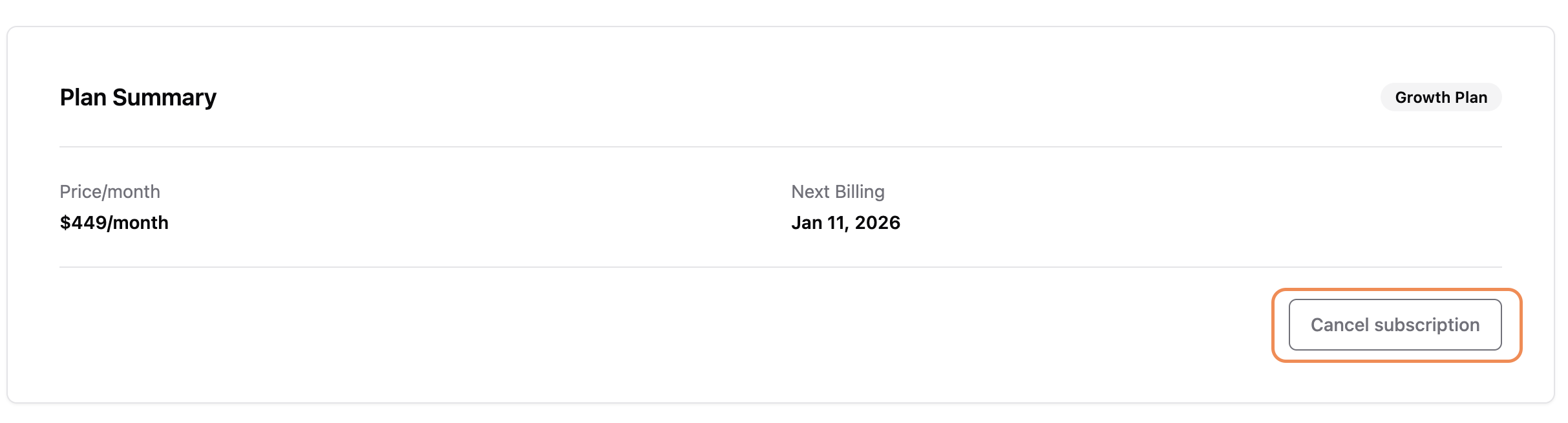
#### Click on **Cancel** **Subscription.**
{% endstep %}
{% endstepper %}
Your account will be canceled at the end of the billing cycle and services will discontinue. Access cannot be resumed.
### FAQs
Can I pause my subscription instead of canceling?
Subscription pausing may be available depending on your plan - contact us at for details.
Can I downgrade my plan?
Yes. Plan downgrades take effect at the end of your current billing cycle.
Will I lose my data if I cancel?
Your data remains available until the end of the billing period. Once the billing period passes, your data will be deleted after 30 days.
Who can manage billing and subscriptions?
Only users with **Admin** permissions can manage billing and subscription settings.
***
### Related Content
{% content-ref url="/pages/PoxqWlpW1BTA8XS6TeTr" %}
[How to Switch Plans](/plans-and-billing/how-to-switch-plans.md)
{% endcontent-ref %}
{% content-ref url="/pages/JS1X3oBd7kXghBB7vyGd" %}
[Limy Plans](/plans-and-billing/limy-plans.md)
{% endcontent-ref %}
{% content-ref url="/pages/yPWHvuDG2qNxuRqYNqTx" %}
[Limy Free Trial](/plans-and-billing/limy-free-trial.md)
{% endcontent-ref %}
Still have questions? We’re here to help. Contact us at **** - we’d be happy to assist.