> For the complete documentation index, see [llms.txt](https://support.limy.ai/llms.txt). Markdown versions of documentation pages are available by appending `.md` to page URLs; this page is available as [Markdown](https://support.limy.ai/monitoring/ai-traffic-monitor.md).
# AI Traffic Monitor
See which visitors arrive from AI engines and what they do on your website.
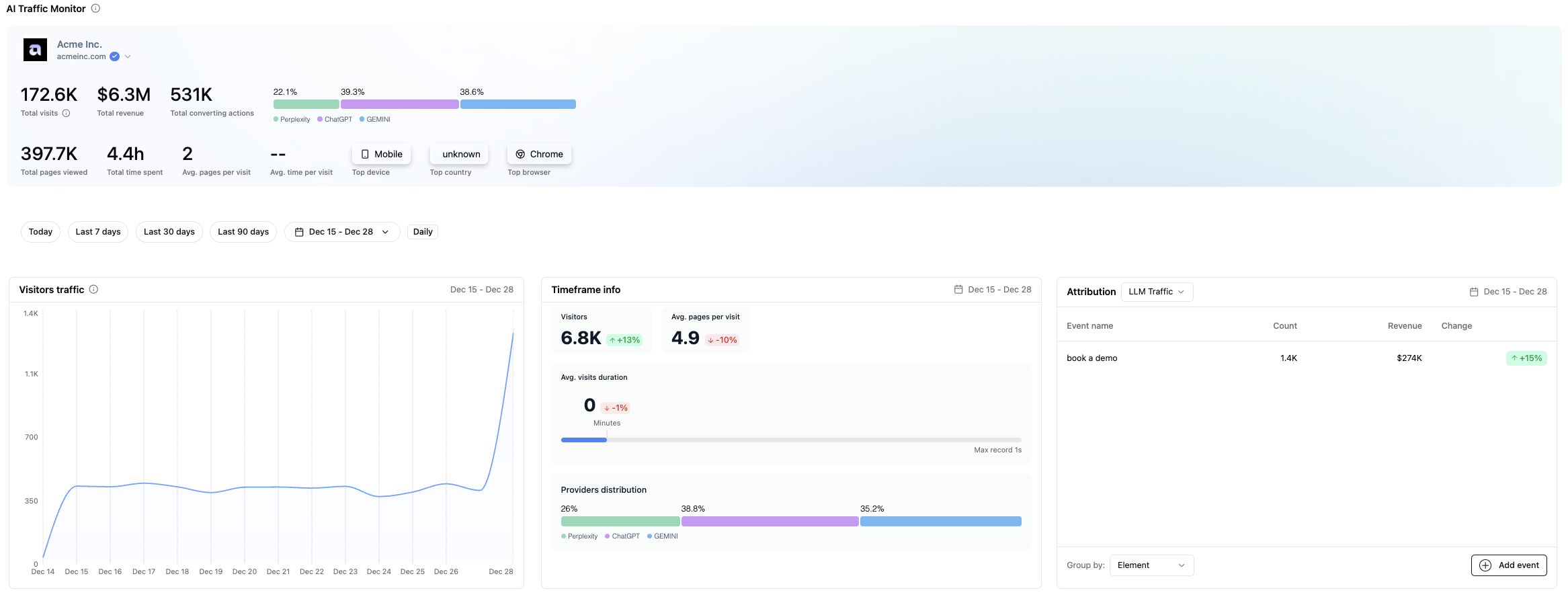
AI Traffic Monitor shows **how real users arrive on your website after interacting with AI-generated answers** on platforms such as ChatGPT, Gemini, and Perplexity.
Using the Limy pixel, it identifies AI-referred sessions and shows which platforms send traffic to your website. It also provides information about those visits, including landing pages, pages viewed, and engagement.
This helps you separate AI-referred traffic from overall website activity and understand what visitors do after arriving.
### Once enabled, AI Traffic Monitor allows you to:
* Identify website sessions referred by AI engines
* See which AI platforms are driving traffic to your site
* Understand which pages AI users land on first
* Analyze engagement metrics such as pages viewed and session depth
This gives teams a clear view of AI-referred traffic and how those visitors engage with their website.
### How to access it:
{% stepper %}
{% step %}
#### Go to your Limy account
{% endstep %}
{% step %}
#### Under Monitoring, navigate to **AI Traffic Monitor**
{% endstep %}
{% endstepper %}
### How to set up the AI Traffic Monitor
Before you set up the AI Traffic Monitor, please ensure that:
* You have access to Google Tag Manager
* You can publish changes to your live GTM container
No engineering changes to your website code are required beyond GTM access.
### Set up instructions:
#### **First, copy the Limy tracking pixel**
{% stepper %}
{% step %}
#### Navigate to **Settings**
{% endstep %}
{% step %}
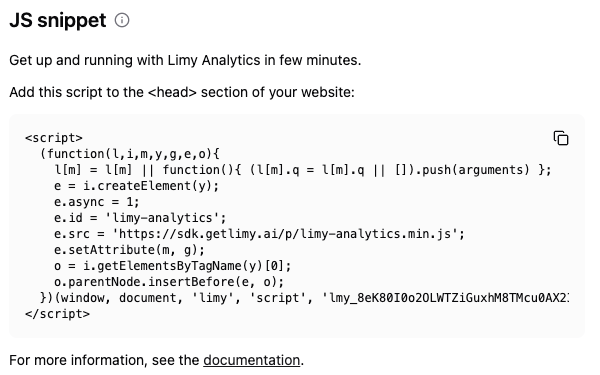
#### Scroll down to JS snippet and copy the Limy tracking pixel code
{% endstep %}
{% endstepper %}
#### **Once you have the Limy tracking snippet:**
{% stepper %}
{% step %}
#### Open **Google Tag Manager**
{% endstep %}
{% step %}
#### Select the container used on your live website
{% endstep %}
{% step %}
#### Go to **Tags** and click **New**
{% endstep %}
{% step %}
#### Choose **Custom HTML** as the tag type
{% endstep %}
{% step %}
#### Paste the **Limy tracking pixel** into the HTML field
{% endstep %}
{% endstepper %}
Once installed, AI Traffic Monitor can show visits from AI sources. If Attribution events are configured, Limy can also show event counts and their assigned estimated values.
{% hint style="info" %}
Users arriving from AI-generated answers are often **higher intent** because AI systems synthesize information, compare options, and surface recommendations before the user clicks through. As a result, AI-driven visitors tend to **be further along in the decision process** than traditional search users, making attribution especially valuable for understanding real business impact from AI discovery.
{% endhint %}
### FAQs
Does AI Traffic Monitor collect personal data?
AI Traffic Monitor tracks session-level website activity. When the Limy pixel is used, Limy may process IP addresses as a data processor on the customer’s behalf.
Does this replace Google Analytics?
No. AI Traffic Monitor complements existing analytics tools by isolating AI-driven sessions as a distinct channel.
Do I need engineering support to set this up?
If you have permission to create and publish tags in Google Tag Manager, you may be able to complete the setup yourself. Otherwise, ask the person who manages your website or tag manager for help.
How long does it take for data to appear?
Data begins appearing after visitors arrive through supported AI sources. How quickly you see meaningful results depends on your AI referral traffic and traffic volume.
***
### Related Content
{% content-ref url="/pages/TqFqtwNJ5aHW2VPaSdr9" %}
[Monitoring](/monitoring/monitoring.md)
{% endcontent-ref %}
{% content-ref url="/pages/bpA7NCiX20OphMSI262Z" %}
[Agent Monitor (CDN-Based Data)](/monitoring/agent-monitor-cdn-based-data.md)
{% endcontent-ref %}
{% content-ref url="/pages/5MMZ2BXUk6D9mEVfmg0g" %}
[How Limy Generates Prompts](/intelligence/how-limy-generates-prompts.md)
{% endcontent-ref %}
\
Still have questions? We’re here to help. Contact us at **** - we’d be happy to assist.