> For the complete documentation index, see [llms.txt](https://support.limy.ai/llms.txt). Markdown versions of documentation pages are available by appending `.md` to page URLs; this page is available as [Markdown](https://support.limy.ai/dashboard/dashboard-overview.md).
# Dashboard Overview
This article explains how to use the Dashboard to understand your brand’s visibility, market share, sentiment, and competitive position across AI-generated answers.
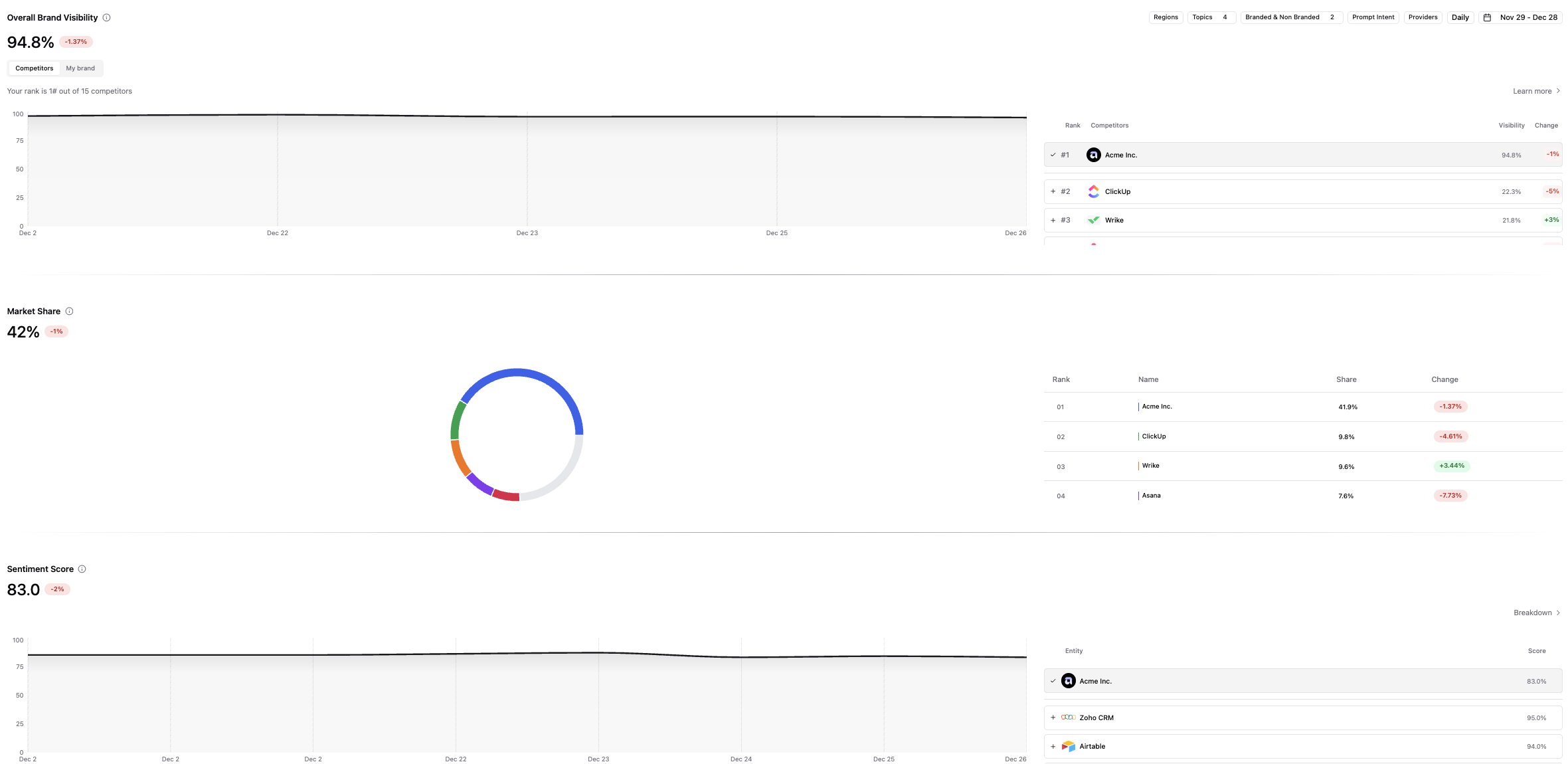
The Dashboard is the central visibility overview of Limy. It shows how your brand appears across AI-generated answers and how that visibility evolves over time.
In AI search, brands are not discovered through ranked links. Instead, AI systems generate answers by **synthesizing information from multiple sources and selectively referencing brands**. This can make it difficult for brands to understand whether they're being mentioned consistently, competitively, or positively.
The Dashboard solves this by aggregating AI visibility signals into a **single, high-level view**. It allows you to quickly understand where your brand stand in AI-generated conversations, how you compare to competitors, and whether your visibility is improving or declining.
Once you log in to your Limy account, you’ll be taken straight to the **Dashboard**. If not, you can access it from the left panel.
### The Dashboard provides a consolidated view of key AI visibility metrics, including:
* **Overall Brand Visibility:** how frequently your brand appears across AI-generated prompts
* **Market Share:** how often your brand is mentioned relative to competitors within the same prompt set
* **Sentiment Score:** how positively or negatively AI systems describe your brand
* **Recommendations**: actionable suggestions for improving visibility across LLMs Together, these metrics give marketing teams a strategic understanding of AI visibility before moving into deeper analysis or execution.
### Use the filters below to refine the data shown on the dashboard:
1. **Region**: Filters prompts and AI answers based on geographic relevance.
2. **Branded vs non-branded:**
1. **Branded**: Shows prompts where your brand is explicitly mentioned in the AI-generated question.
2. **Non-branded:** Shows prompts where your brand is not mentioned, but relevant competitors or category terms are.
3. **Topic:** Filters prompts based on the themes they relate to, whether added by you or automatically created by Limy.
4. **Provider**: showing you the different LLMs the prompts are run on (ChatGPT, Gemini, Perplexity, Google AI Mode, Google AI Overview).
5. **Prompt intent:**
1. **Commercial**: Shows prompts where users are comparing options, evaluating products, or considering a purchase decision.
2. **Informational**: Shows prompts where users are seeking education, explanations, or general knowledge about a topic or solution.
3. **General**: Shows prompts focused on brand identity, reputation, or high-level understanding, without a clear buying or research intent.
6. **Date** **range**: Filters data to a specific time period to analyze trends or measure change over time.
{% hint style="info" %}
**The** **Dashboard** **overview** gives you a quick snapshot of activity across your account. You can dive deeper into each section to explore and analyze more detailed data as needed.
{% endhint %}
### FAQ
What does the Dashboard show at a high level?
The Dashboard provides a consolidated view of your brand’s visibility, market share, sentiment, and trends across AI-generated answers.
Why does my visibility or market share change over time?
AI systems continuously refresh their answers based on new sources, updated content, and model changes, which can cause natural fluctuations in visibility.
How often is the Dashboard updated?
The Dashboard updates as Limy analyzes new AI-generated answers, reflecting trends over time rather than real-time changes.
Can I compare my brand to competitors on the Dashboard?
Yes. The Dashboard includes market share and comparative views that show how frequently your brand appears relative to competitors.
What should I do if I notice a sudden drop or spike?
Use filters and drill into prompts, sentiment, or sources to understand what changed, then review recommendations to identify corrective or reinforcing actions.
***
### Related Content
{% content-ref url="/pages/oOwP6cxbNQsWB1DC42Hk" %}
[Overall Brand Visibility](/dashboard/dashboard-overview/overall-brand-visibility.md)
{% endcontent-ref %}
{% content-ref url="/pages/MyHHhCsaPf3IE2bjgEtl" %}
[Market Share Analysis](/dashboard/dashboard-overview/market-share-analysis.md)
{% endcontent-ref %}
{% content-ref url="/pages/RNH2BMldfGSIJToQKEuO" %}
[Broken mention](broken://pages/RNH2BMldfGSIJToQKEuO)
{% endcontent-ref %}
{% content-ref url="/pages/LTbYDDYNgV7bSGqf9tOC" %}
[Recommendations](/dashboard/dashboard-overview/recommendations.md)
{% endcontent-ref %}
{% content-ref url="/pages/cXcriWc6pg8rjaM8BICp" %}
[Filters](/general/filters.md)
{% endcontent-ref %}
***
Still have questions? We’re here to help. Contact us at **** - we’d be happy to assist.