> For the complete documentation index, see [llms.txt](https://support.limy.ai/llms.txt). Markdown versions of documentation pages are available by appending `.md` to page URLs; this page is available as [Markdown](https://support.limy.ai/settings/users-and-roles/adding-new-users.md).
# Adding New Users
This article will show you how to add users to your account.
You can add new users to your Limy workspace to collaborate on analysis, recommendations, and reporting. Only users with Admin permissions can invite new team members and assign roles.
### To invite a new user to your workspace:
{% stepper %}
{% step %}
#### Log in to your Limy account
{% endstep %}
{% step %}
#### Navigate to **Settings**
{% endstep %}
{% step %}
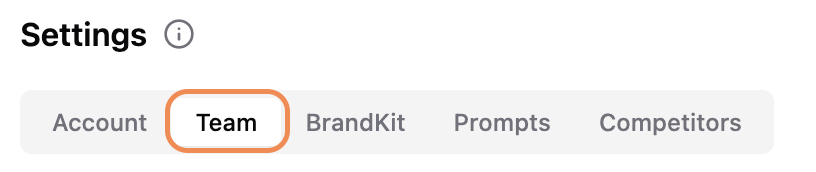
#### Select **Team**
{% endstep %}
{% step %}
#### Click on **Add user**
{% endstep %}
{% step %}
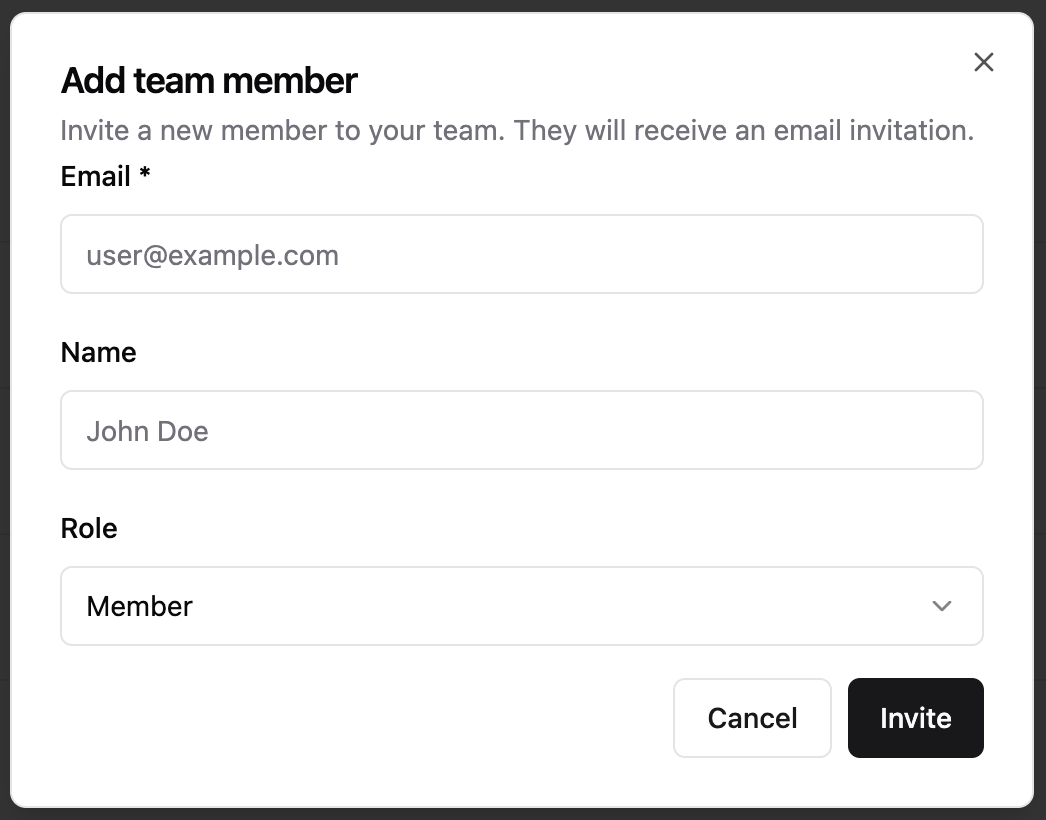
#### Fill out their details and click on **Invite**
{% endstep %}
{% endstepper %}
Once added, the user will appear in the team list and the user will receive an email inviting them to the platform. They will now have access to the platform.
### FAQs
Who can manage users?
Only users with **Admin** permissions can add, remove, or update users.
Can I have multiple admins?
Yes. You can assign Admin access to multiple users if needed.
Can I restrict access to specific features?
Yes. Admin will have access to every feature and action on the platform, whilst member will only be able to view and apply filters.
***
### Related Content
{% content-ref url="/pages/pJKvZFl4bbD5L2UbEizu" %}
[Manage Users](/settings/users-and-roles/manage-users.md)
{% endcontent-ref %}
{% content-ref url="/pages/1yBjpt1M5rHVBBSlDhvL" %}
[Settings](/settings/settings.md)
{% endcontent-ref %}
Still have questions? We’re here to help. Contact us at **** - we’d be happy to assist.